Mar 2026
4 min
tynding is a minimalist API that lets you fully connect your R and Typst workflows.
When people want to create PDFs containing data (charts, statistics, figures, etc.), they often need to:
Fortunately, tools like Quarto let us keep those two steps in the same document. However, many people want to export to a single specific format (PDF, HTML, etc.), and Quarto then becomes mainly useful because of its unified interface, especially with Typst.
But working with Typst inside a Quarto document is not a great experience: there is no language server and no auto-completion. So you often need to create a separate Typst file and call that file from Quarto, which works well, but also reduces the benefit of having everything in a single document.
Instead, we could have a separate R file and a Typst file: one controls the data logic while the other controls the styling of the document.
tyndingThe aim of tynding is to make creating PDFs with R and Typst as simple as possible. In your R script(s), you can write as much as you want: fetch, clean, and visualize your data, then send all of that information to a Typst document.
library(tynding)

typst_compile(
  "file.typ",
  title = "Quarterly report",
  author = "Joseph",
  persons = list(
    list(name = "Joseph", age = 25),
    list(name = "Justine", age = 24),
    list(name = "Isaac", age = 2)
  )
)
On the Typst side (file.typ):
#set page(width: 10cm, height: 4cm, fill: rgb("#fca311"))

#let title = sys.inputs.at("title")
#let author = sys.inputs.at("author")
#let persons = json.decode(sys.inputs.at("persons"))

= #title
*Author:* #author

#for person in persons [
  #strong(person.name) is *#person.age* years old. ]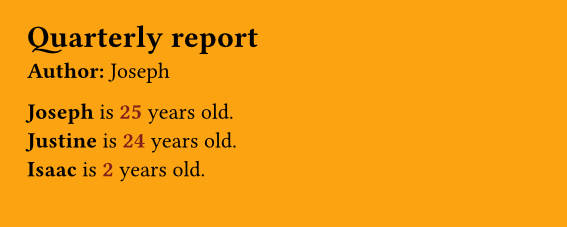
Tynding automatically sends your inputs to the Typst document and JSON-encodes objects with a length greater than 1. This means that you can send many kinds of R objects to Typst: vectors, data frames, strings, numbers, etc.
You can use Typst in two ways:
In the latter case, you need to install it. But once it is installed, you can only use it from the terminal (CLI), not directly from R. The typr package wraps the Typst CLI to let you use it from R, which is a convenient way to build on top of CLIs in general.
But tynding uses a more "native" approach by using the actual Typst compiler under the hood. Thanks to Typst being built in Rust and to extendr, building Rust-based R packages has become much simpler, much like using C++ in many other R packages.
This means that once tynding is installed, you're ready to compile Typst documents. No need to install anything else separately.
This is just a short overview of tynding, but you can learn more and find more examples here.