May 2026
4 min
What if making PDFs were easier, faster, and required less code?
Pagedown has been a go-to tool for generating PDF reports from R, but it comes with some friction such as slow compilation, sprawling CSS, and bugs that get harder to fix as templates grow. This post is about why Typst is a compelling alternative, and what a migration from pagedown looks like in practice.
When we need to create PDF reports that include data (charts, statistics, ...), we often use tools like:
Those tools work with markdown-like documents that are then converted to PDF using a specific engine. For a long time, people used LaTeX because it offers a solid PDF engine, but its syntax isn't very intuitive and it's hard to do advanced customization.
Then people from the web development world started using web technologies (HTML & CSS) to create PDFs. The main benefit of this is that CSS (the language used to style every website) is a tool meant for styling content, from colors to layouts, shapes, etc., AND has "print" features. We can use Chrome in headless mode (e.g., without opening the Chrome application) to take a screenshot of our pages, and we get a PDF from a web page!
Some tools also started to appear to make this process simpler, in particular: pagedown.
Pagedown is "just" an R wrapper around paged.js, a JavaScript library that does the HTML/CSS to PDF conversion under the hood. It's mostly meant to be used within R Markdown.
Pagedown works very well: you can create very complex PDFs, automate what needs to be automated, and it feels like a robust tool. The catch is that you often need to write lots of CSS, or even sometimes JavaScript, which isn't fun or easy, even with the help of AI since this field is quite niche.
And the more advanced the template, the more this hurts. I've built Pagedown templates with hundreds, if not more, lines of CSS/JavaScript: they work, but at that scale fixing bugs becomes complex, and compilation gets hella slow.
Then I started hearing about Typst, a language designed just to create PDFs. And many people are saying it's really good, so I decided to give it a try.
I'm blown away by the compilation speed and how easy it is to work with! I wish Typst existed 3 years ago when we were building out our other reports [...] and when I was writing my PhD thesis.
Typst is amazing. It's a tool that is really modern, built for humans, with a great focus on syntax readability, opinionated choices and amazing performance.
Like any other tool, you need to learn how to use it, but this one really feels intuitive once you start using it, especially compared to CSS, which stays hard even after hours spent using it.
The simplest way to go from Pagedown to Typst is to use it with Quarto and specify the Typst format:
---
title: "Hello Typst!"
format: typst
---
And now Quarto will automatically use Typst to create your PDF! The default template isn't really good-looking, but Quarto has great features for Typst that let you define custom, reusable templates and write Typst code directly.
Typst can feel weird at first because it's a markup language (e.g., markdown, HTML, etc.) with scripting features (think if/else statements, functions, for loops, etc.). Take a moment and try to understand the following code:
#let my-component(lab, col) = { // function definition
  align(horizon, stack(
      dir: ltr,                // left to right
      spacing: 0.3cm,          // space between circle and text
      circle(fill: col, width: 0.7cm),
      text(fill: col, lab)
   ))
}

#my-component("Ready", green)
#my-component("Pending", yellow)
#my-component("Blocked", orange)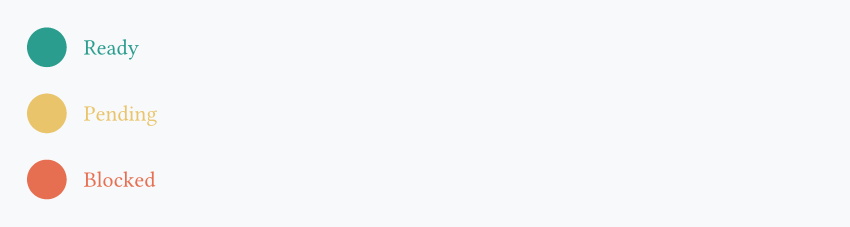
Typst is fast, really fast. When you compare it to pagedown, you get something between 5x and 15x faster, depending on whether you use Quarto with Typst or Typst directly. This adds up quickly as soon as you try to automate your PDF generation and/or make a lot of iterations on your project.
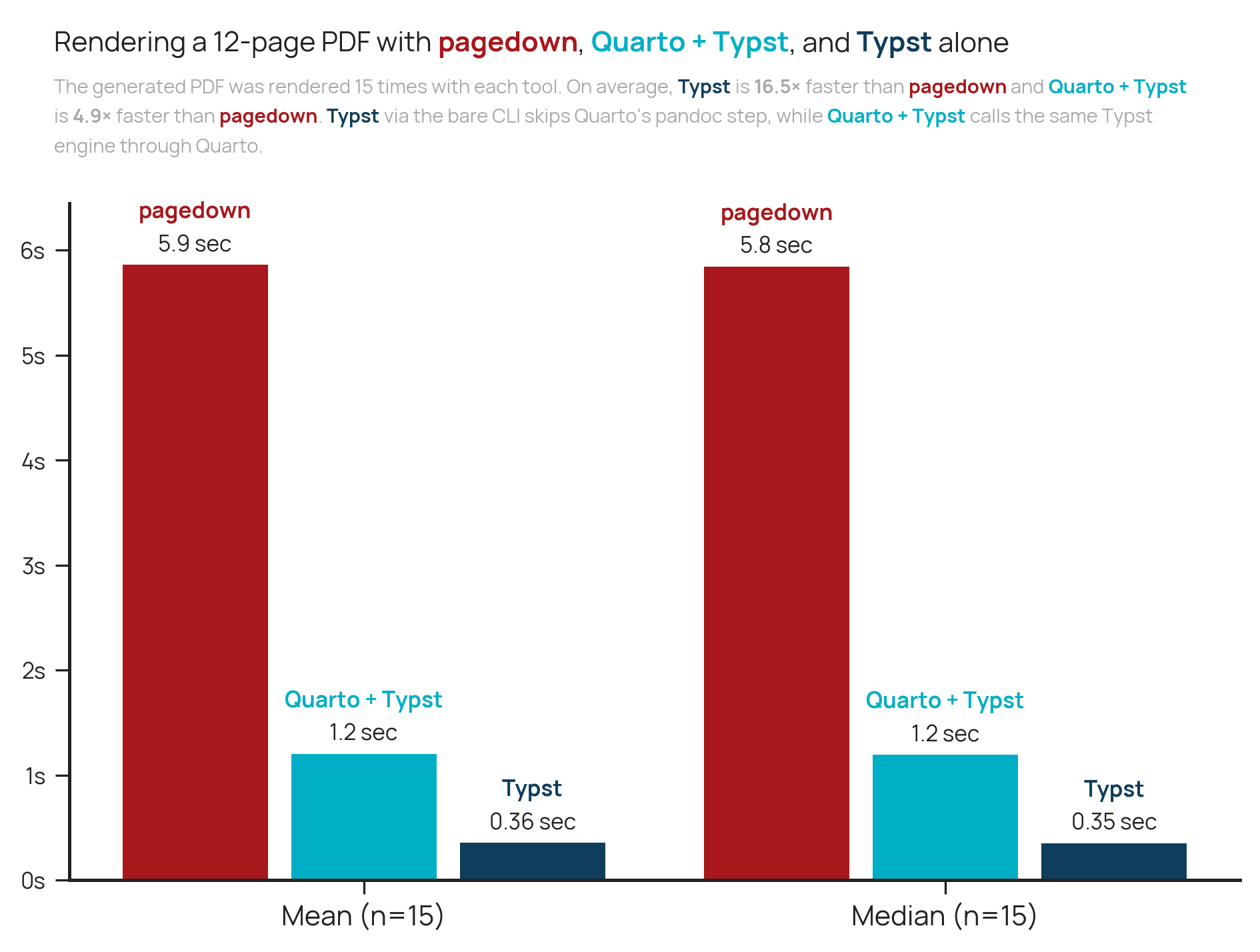
You can find the code for this benchmark here.
The answer is probably yes, but this requires some nuance. If you like pagedown and if it works for you, then keep using it! No need to fix a problem that doesn't exist.
On the other hand, if your PDF generation feels slow, you feel limited by what you're able to do, and you want to use more modern solutions, then it might be a good time to investigate what Typst can do for you. It's unlikely that you'll find something Typst can't do, and even more unlikely that you'll ever want to go back. Once you start using Typst, you don't want to stop.
This blog post isn't meant to provide an end-to-end solution on how to migrate, but rather give you hints on which direction to go.
pagedown::html_paged() to format: typst.Each step here can take more or less time, and be more or less complex. Migrating a complex pagedown template isn't a one-hour thing!
Note that you can also easily use Typst from R without using Quarto. This is possible thanks to tynding, an R package that lets you create your PDFs from R. This also means that you'll need to know Typst, and you'll lose some Quarto features. You can learn more here.